SMS opt-in flow
Last updated: August 16, 2026
This page documents, in full, every way a mobile number can come to receive an SMS from SolidPing. It exists so that mobile carriers and messaging-campaign reviewers can inspect the complete opt-in workflow without needing an account: the consent step itself lives inside a signed-in dashboard, so it is reproduced here verbatim.
For the policy this flow implements — message types, frequency, how to stop — see the SMS & Messaging Policy.
| Programme name | SolidPing Alerts |
| Operated by | WEBINGENIA SARL, trading as SolidPing |
| Website | https://www.solidping.io |
| Message class | Transactional only — no marketing, ever |
| Consent model | Self-service opt-in by the number's own owner, confirmed by a one-time code sent to the handset |
There is exactly one way to enrol your own number
A phone number is never required to create or use a SolidPing account. Every feature of the product works with email alone. Adding a phone number is optional and is always initiated by the person who owns the handset, from inside their own authenticated account.
There is no pre-ticked box, no bundled consent at sign-up, no imported list, no purchased data, and no way for one user to enrol another user's number for alerts.
Every screen below is a real capture of the live dashboard, produced by an automated pipeline rather than by hand, so these images cannot drift from the shipped interface.
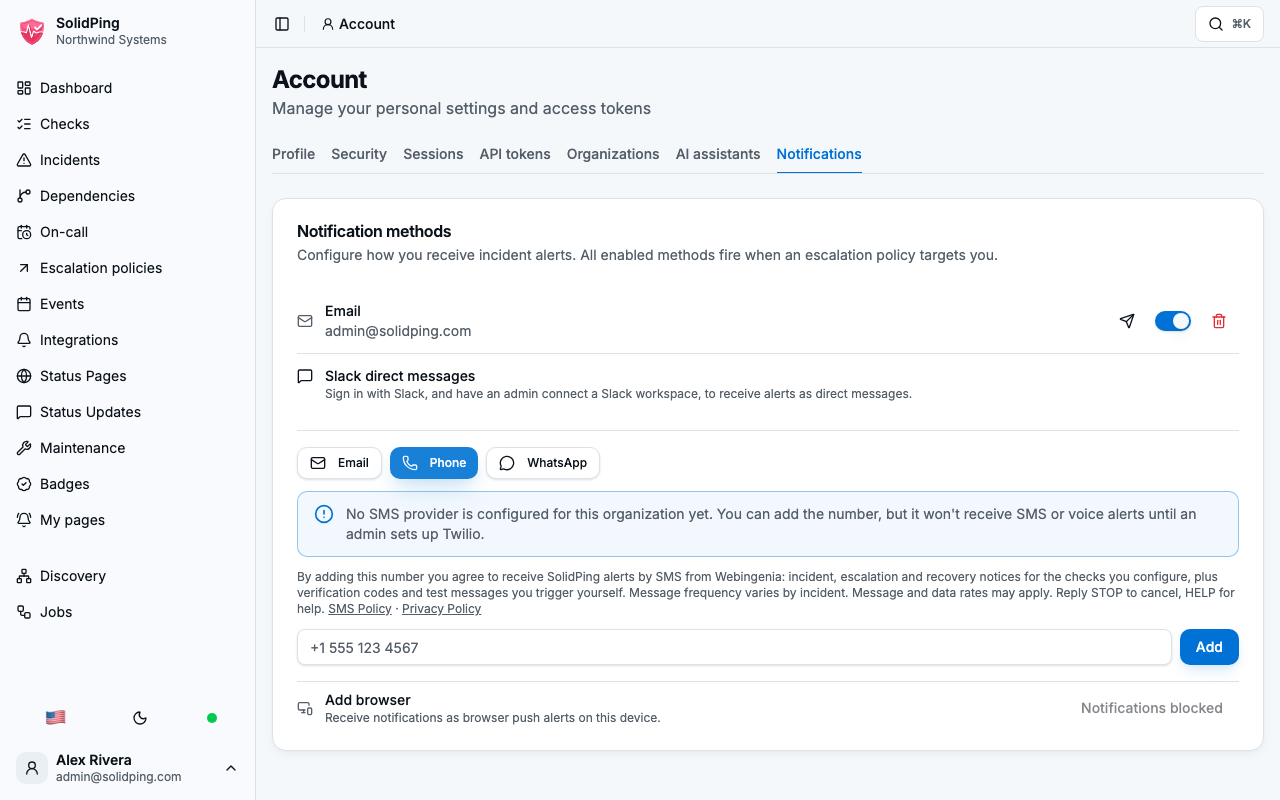
Two things visible in them are worth stating plainly rather than editing out. The organisation shown is a freshly created demo organisation, and it has no SMS provider connected yet — hence the blue notice about an administrator setting up Twilio. The consent disclosure appears regardless, which is the point: it is bound to the act of adding a number, not to whether the organisation happens to be ready to send.
Step 1 — Sign in and open your notification settings
Sign in at https://www.solidping.io, then go to Account → Notifications. Nothing has been asked of you at this point and no phone number is on the account.
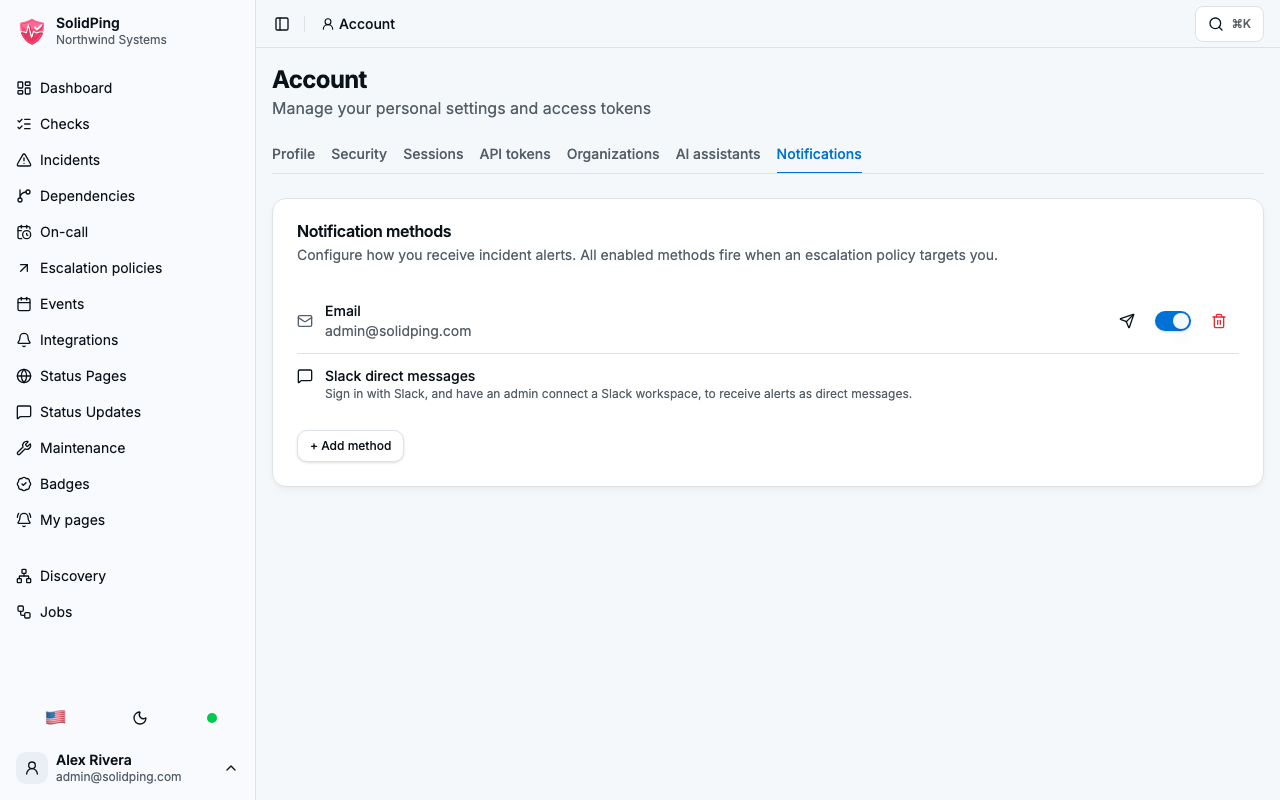
Step 2 — Choose "Phone" and read the consent notice
Selecting the Phone contact type reveals the consent notice below the selector, before the number can be submitted. Its wording is:
By adding this number you agree to receive SolidPing alerts by SMS from Webingenia: incident, escalation and recovery notices for the checks you configure, plus verification codes and test messages you trigger yourself. Message frequency varies by incident. Message and data rates may apply. Reply STOP to cancel, HELP for help.
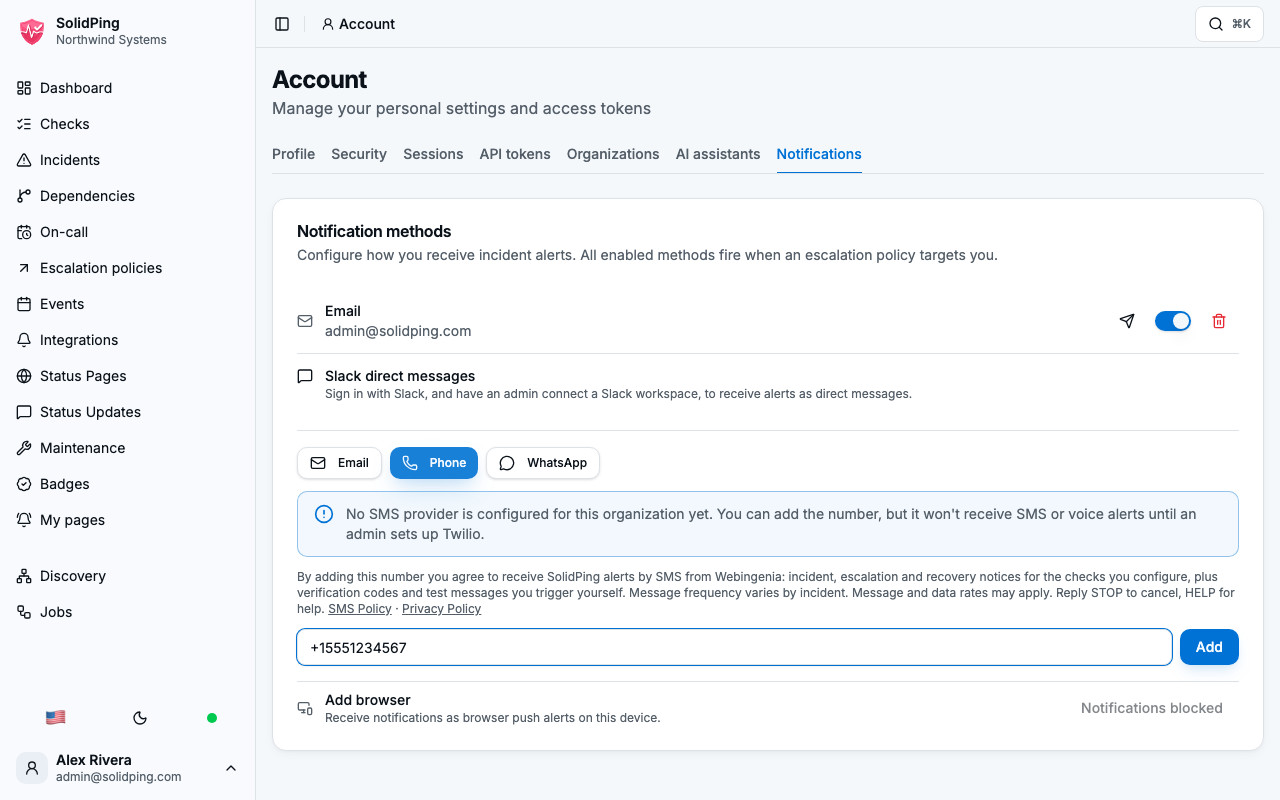
Step 3 — Enter your own number and submit
Enter the number in international E.164 format (for example +15551234567) and
press Add. The disclosure stays on screen while you type it: the consent
language is read before consent is given, not after. Submitting the form is the
affirmative act of consent — a deliberate action by the number's owner, never a
default.
Step 4 — Prove you hold the handset
The new contact appears marked Unverified — verify to receive SMS / voice alerts.
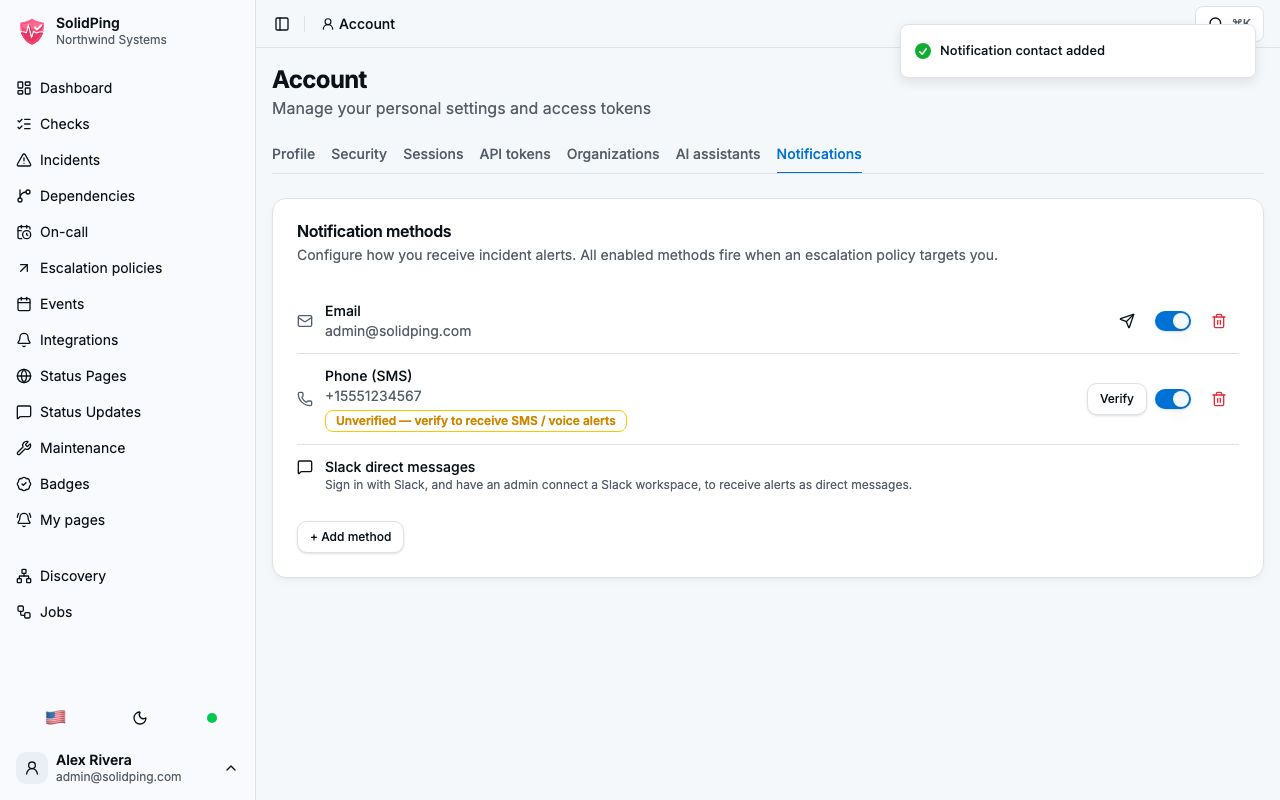
Press Verify next to it and we send a 6-digit code by SMS:
[SolidPing] Your verification code is 481902 (valid 10 minutes). Reply STOP to unsubscribe.
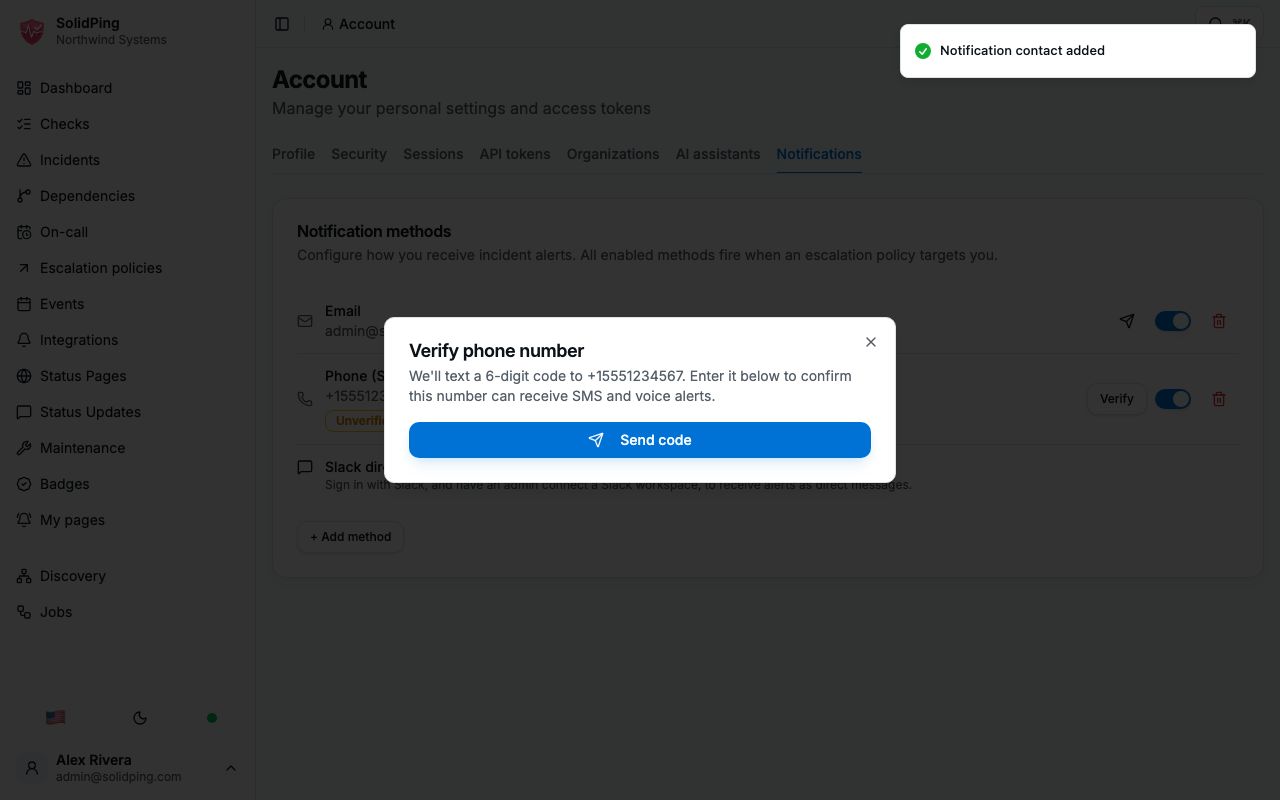
Type the code back into the dashboard to confirm. Codes expire after 10 minutes, allow 5 attempts, and can be re-sent at most 3 times per hour.
A number that has not completed this verification is never sent alert messages. Verification is the point at which consent becomes effective.
Step 5 — Choose what you want to be paged about
Verification alone does not start any traffic. You must additionally select SMS as a delivery channel for the alert severities you want to be paged on. Until you do, no alert is ever sent to the number.
Opting in is therefore a four-part act: choose the channel, submit your own number, prove you hold the handset, and select what it should be used for.
The one other path: an organisation's own shared number
An organisation administrator may configure a shared team or on-call number on their organisation's own messaging integration, using their organisation's own messaging credentials. This is the classic operational rota case — a duty phone carried by whoever is on call.
Those numbers belong to the organisation that configures them, and that organisation is responsible for having the consent of whoever carries the handset. The same STOP handling applies to them, and it takes effect at the carrier layer regardless of the account's configuration.
How to stop messages
Reply STOP to any message. You are unsubscribed immediately and receive no
further messages at that number. Reply START to resubscribe.
STOP, STOPALL, UNSUBSCRIBE, CANCEL, END, QUIT, OPTOUT and REVOKE
all work. Opt-out is handled at the messaging-carrier layer, so it takes effect
regardless of the state of the SolidPing account.
You can also remove the number from Account → Notifications at any time, or drop SMS from the delivery channels of your alert severities. See Exercise your rights for full deletion.
Every recurring alert we send ends with Reply STOP to unsubscribe.
How to get help
Reply HELP or INFO to any message, or email
contact@solidping.io.
What the messages look like
These are the exact production formats. acme-corp is the organisation slug and
Payments API the name of a check the recipient configured themselves.
| Trigger | Message |
|---|---|
| A monitored service goes down | [SolidPing] acme-corp: Payments API is DOWN. Ack: https://solidping.io/api/v1/orgs/acme-corp/incidents/01a07221/ack?token=eyJhbGci… Reply STOP to unsubscribe. |
| The incident is not acknowledged | [SolidPing] acme-corp: Payments API STILL DOWN (escalated). Ack: https://solidping.io/api/v1/orgs/acme-corp/incidents/01a07221/ack?token=eyJhbGci… Reply STOP to unsubscribe. |
| The service recovers | [SolidPing] acme-corp: Payments API RECOVERED. Reply STOP to unsubscribe. |
| You add a number | [SolidPing] Your verification code is 481902 (valid 10 minutes). Reply STOP to unsubscribe. |
| You press "send test" | [SolidPing] Test notification. Your SMS delivery is working correctly. Reply STOP to unsubscribe. |
Frequency is entirely event-driven: messages are sent only when a service you monitor changes state. Most accounts receive none in a typical week.
Data
Phone numbers are used solely to deliver the alerts and verification codes above. We do not sell personal data, do not use it for advertising, and do not share it with third parties for their own purposes. Phone verification stores only a hash of the in-flight code, never the code itself, and discards it once verification completes or expires.
SMS and voice are delivered through Twilio, listed in our Sub-processors. Retention and legal bases are in the Privacy Policy.
Contact
WEBINGENIA SARL — 14 rue Félix Faure, 75015 Paris, France SIREN: 519 411 680 — SIRET: 519 411 680 00043 contact@solidping.io